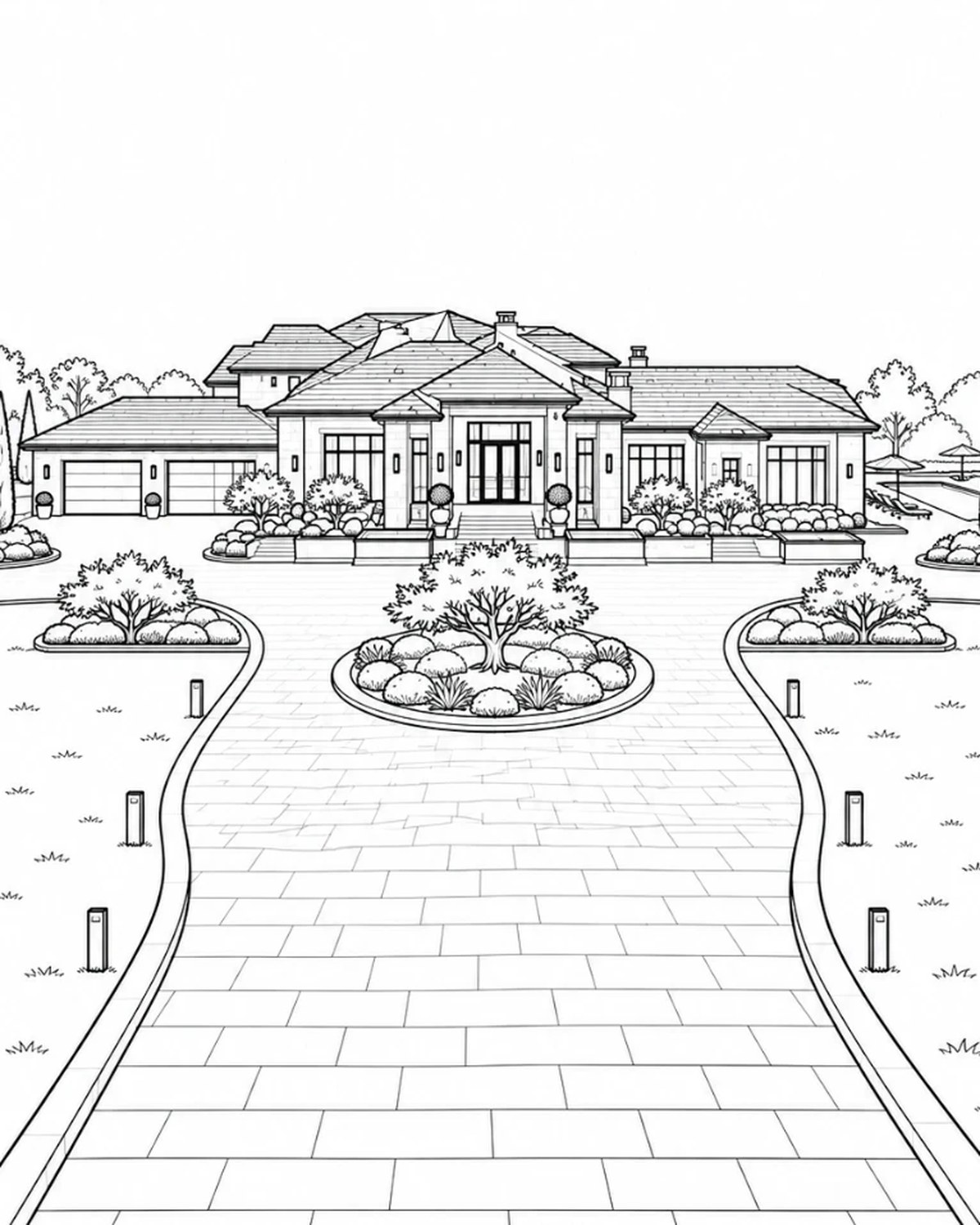
This project is a website for Structiv, a studio in Greater Dallas that designs and builds custom homes. It opens with an empty lot that turns into a finished estate in fifteen seconds. Then you scroll sideways through seven screens: the drawings, the lighting, the interiors, the process, a cost estimator and the studio itself. I made it with AI at every step. Here's the video, or read on for the written version.
 Play video
The video follows the build in order. This post is more about the thinking: why the site opens with a film, why it scrolls sideways, and what I took out once it was running in a browser.
Four questions before any design
The brief came down to four things the site had to do:
- Explain in a few seconds that one team does everything: design, construction and interiors, all the way to handover.
- Look premium and be memorable, without turning into a real-estate listing.
- Answer what clients worry about before they build: what will it cost, how long will it take, and who is responsible?
- Bring in the right inquiries, and help people whose budget or needs don't fit see that for themselves, before anyone spends time on a call.
There was also one real house to build everything around. Every image and every screen had to show that same house: the same roofline, the same windows, the same driveway.
The first point mattered most. "One team, from start to finish" is easy to claim and easy to skip over. Every builder says it. So I wanted visitors to watch it happen instead of reading it.
One line, nine shots
The idea: open the site with a single continuous shot, an empty lot slowly becoming a home someone actually lives in. No cuts and no jumping between projects, just one house, one camera and one team's work.
Before making any images, I broke that journey into nine shots:
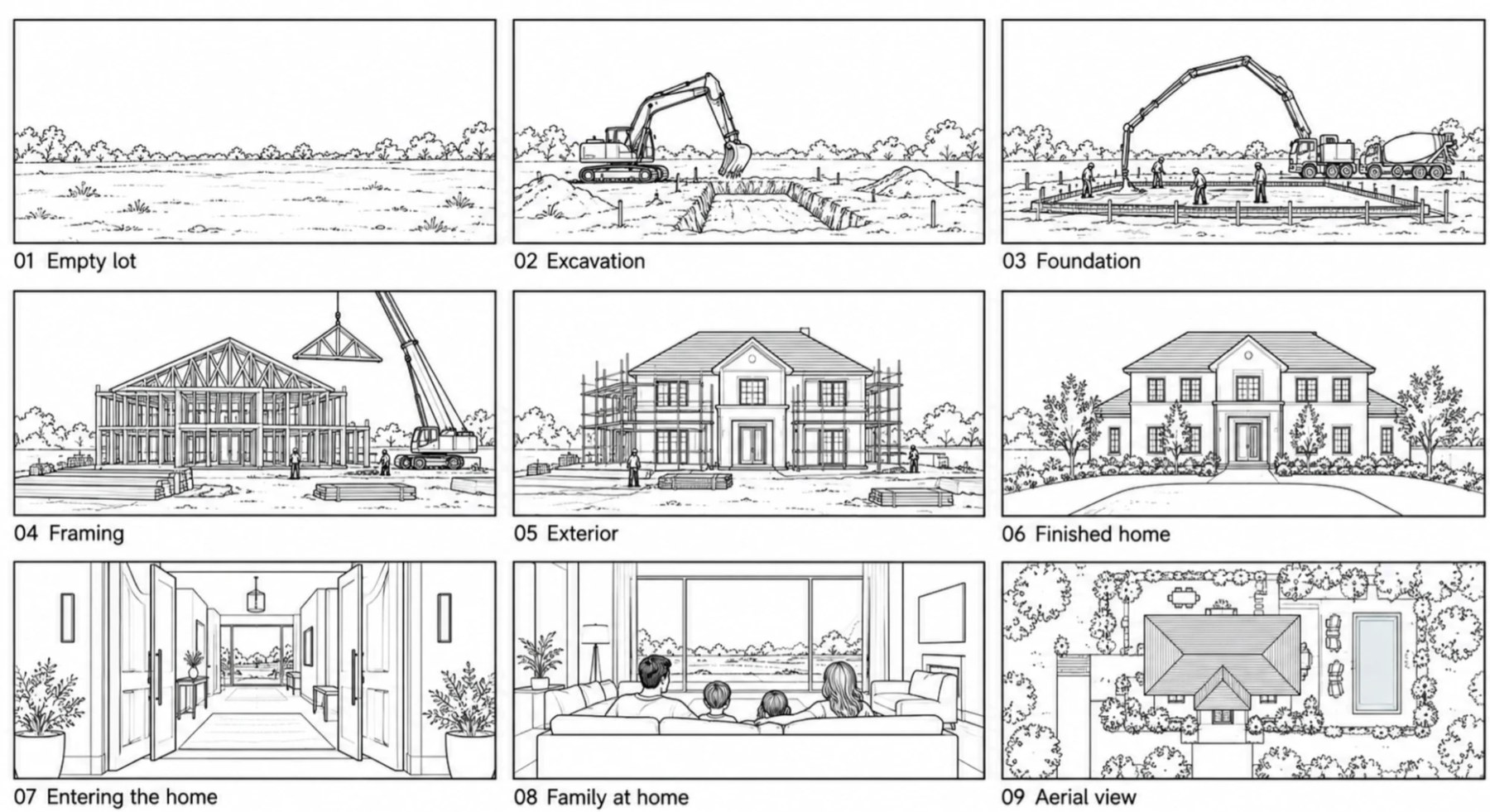
Each row has a job. The first row starts construction: an empty lot, then the excavator, then the foundation. The second row gives the house its shape: framing, the exterior, the finished home. The third row turns from building to living: through the front door, a family on the sofa, then up into the air for the whole estate.
That last row is the point of the film. A builder's site could easily stop at "finished home." But the client isn't buying a building, they're buying the day they move in. So the film goes inside before it ends.
With the storyboard set, I made the images for each shot. That took many rounds of generating and discarding, and the test wasn't whether a single frame looked good. I put the whole set side by side and asked: is this obviously the same house at different stages? Do the windows sit in the same place? Does the driveway curve the same way? A beautiful frame that broke the continuity went in the bin, because the film would only hold together if every shot led into the next.
On the site, the film carries a little live data: a day counter that runs from Day 001 to Day 412, and a label for the current phase (Site & Foundation, Framing, Envelope, Landscape & Finishes). The opening headline is "Every estate starts as dirt." and the closing one is "From first dig to first dinner." When the camera settles on the aerial view, five markers appear on the house (the skylight, the pool, the motor court, the olive grove, the limestone facade), and each opens a small card with a close-up.
Why sideways, and why drawing sheets
For the rest of the site I wanted the browsing itself to feel like moving along a path, one step after another. So it scrolls horizontally, one full screen at a time.
The idea that tied it together came from the client's own world. Architects deliver a house as a set of drawing sheets: A-00, A-01, A-02 and so on. So every screen became a sheet, numbered A-00 to A-06, and moving to the next screen feels like turning to the next drawing. The type, the hairlines, the warm paper colour and the single bronze accent all come from that idea.
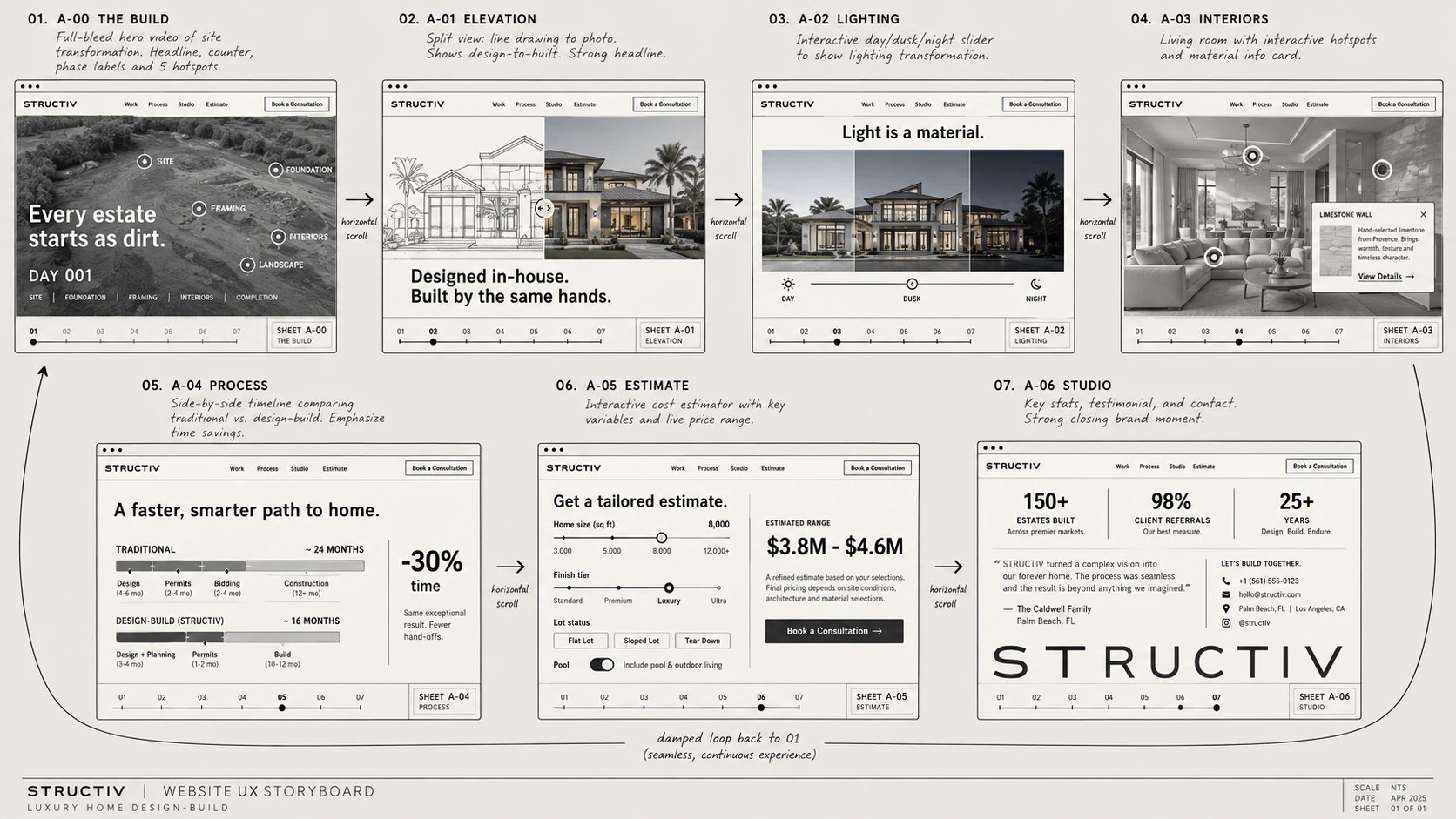
Before any visual design, I gave each sheet one job:
| Sheet | What it shows | The question it answers |
|---|---|---|
| 01 The Build | The film, with the day counter and markers | What does "one team" look like? |
| 02 Elevation | Blueprint on one side, photo on the other | Can they really design? |
| 03 Lighting | The same house from day to dusk to night | Do they think about details? |
| 04 Interiors | The great room, with material markers | Is the inside as good as the outside? |
| 05 Process | Traditional versus design-build timelines | How long will it take? |
| 06 Estimate | A cost range in thirty seconds | What will it cost me? |
| 07 Studio | Numbers, a testimonial, contact | Can I trust them, and how do I start? |
The order is a funnel. The first four sheets win attention and build trust, the next two answer the practical questions, and only then does the site ask for a call. Keep scrolling past the last sheet and you loop back to the empty lot. The story of one finished house becomes the invitation to start the next one.
Copy that sounds like a builder
I set a few rules for the words before writing any headlines. Keep it short and declarative. Use numbers wherever possible: days, square feet, months. And no "dream home," "luxury living" or "world-class." Those phrases make a site read like an advert, and this audience has seen plenty of adverts.
The headlines ended up as plain statements, each one making a claim that its sheet then shows:
- Designed in-house. Built by the same hands.
- Light is a material.
- Finished by the team that framed it.
- A simpler, faster path to an exceptional home.
- What will your home cost?
- One team. From dirt to dinner.
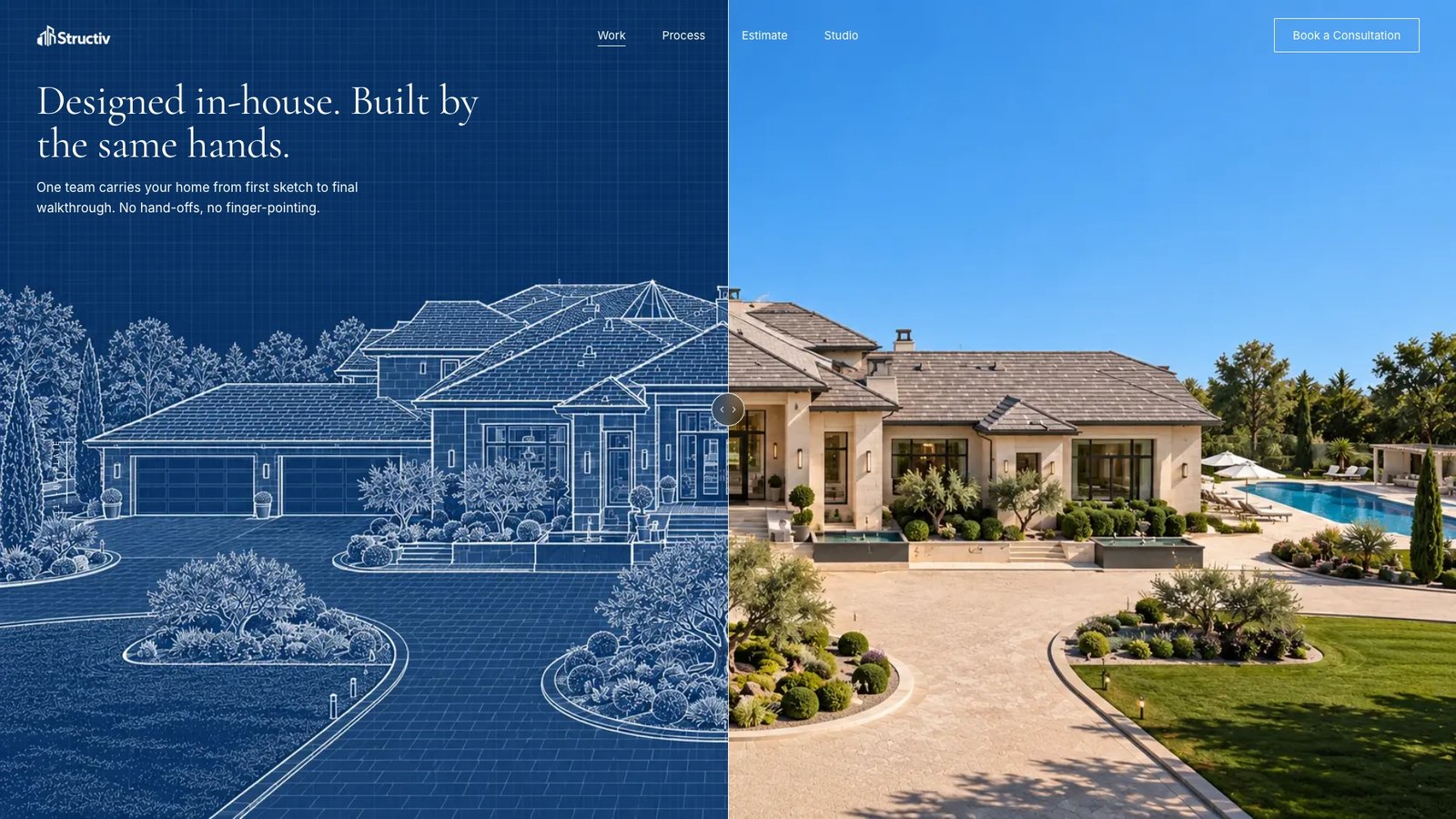
The Elevation sheet is the clearest example of showing rather than telling. The left half is a line drawing traced from the photo, line for line, and the right half is the finished house. Drag the divider and the drawing becomes the building. The headline doesn't have to argue much after that.
The estimator answers the hardest question
The question people least like asking a builder is "how much?" So I gave it its own sheet.
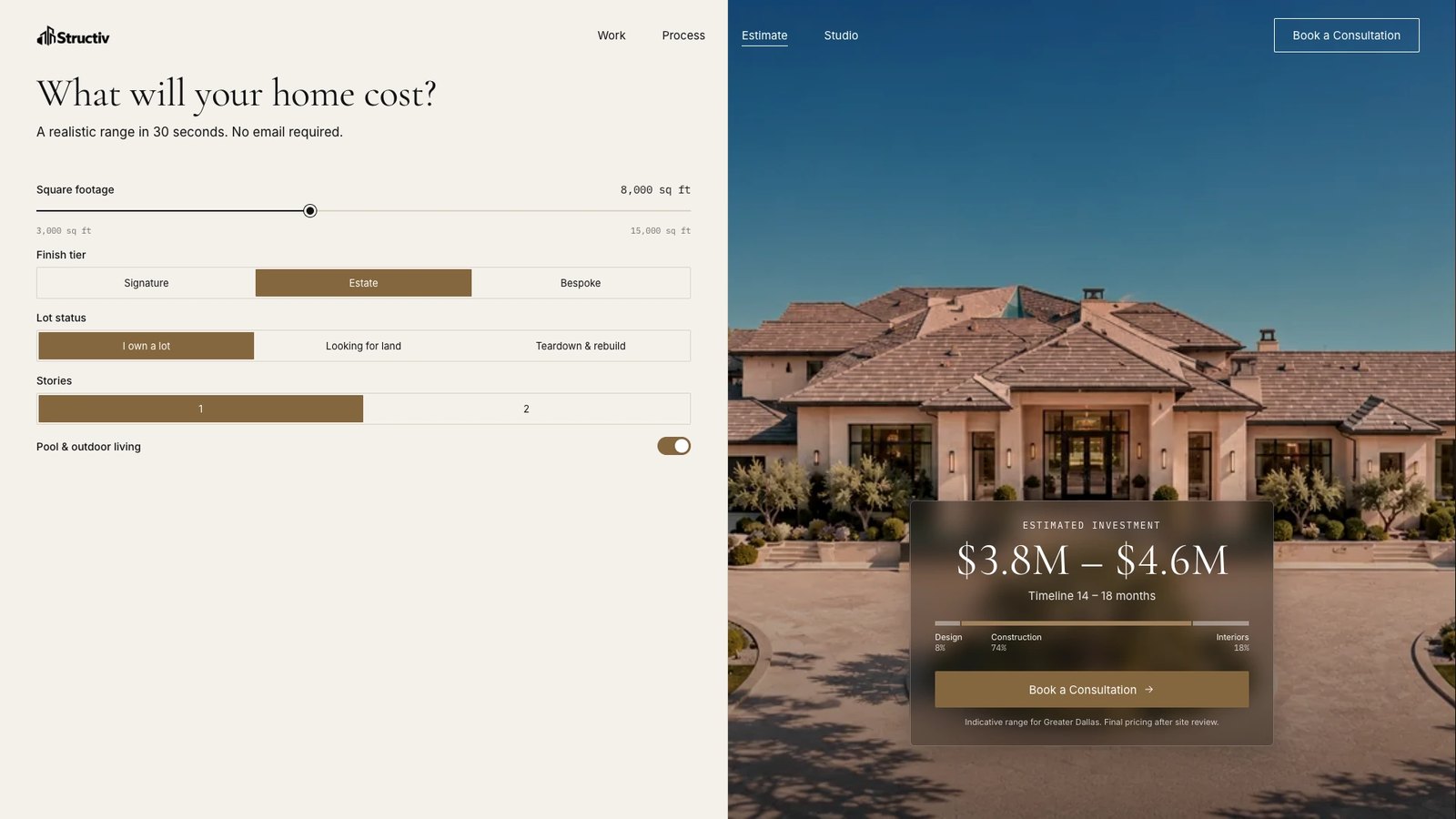
Five inputs: square footage, finish tier, lot status, number of stories, and pool and outdoor living. The result is a range, not a single number: with the defaults, $3.8M–$4.6M and 14–18 months, split into design, construction and interiors. Under it, a line says the range is indicative for Greater Dallas and final pricing comes after a site review.
A few decisions mattered here:
- A range, not a quote. A single number reads like a promise nobody can keep before seeing the lot. A range is honest and still useful.
- No email required. The estimate is there to help visitors decide, not to capture them. If it fits, the button right under the result opens the consultation form with the estimate already filled in.
- It filters as well as sells. Someone hoping for a $1M home learns in thirty seconds that this isn't the right studio, and that's a good outcome for both sides. That was the fourth point of the brief.
Behind it is one simple formula (size × rate for the tier, plus fixed amounts for a pool or a teardown), with all the numbers in one file. When the client wants to change a rate, it's a single edit.
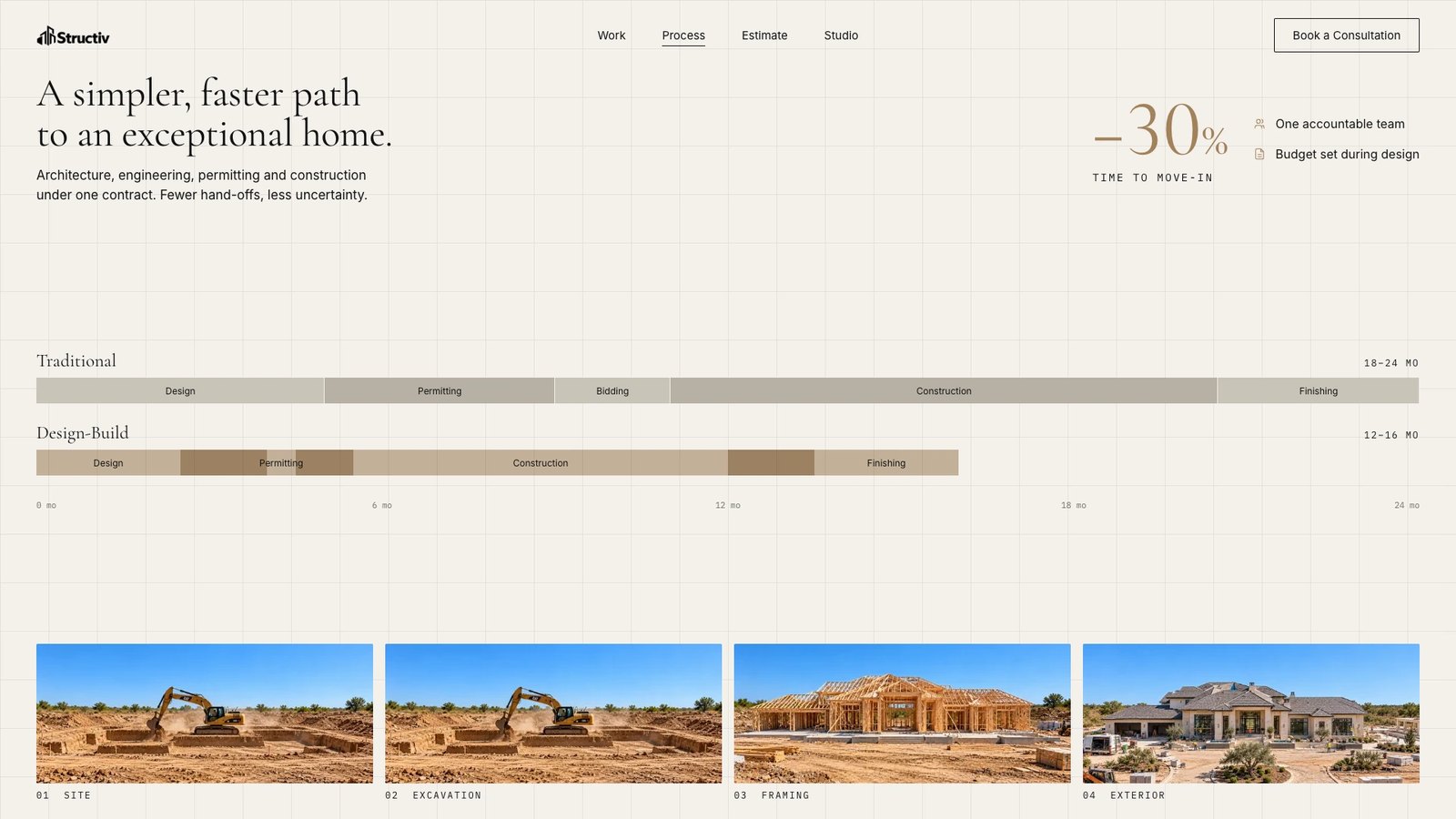
The Process sheet answers "how long" in the same spirit. Two timelines on one scale: the traditional route, with design, permitting, bidding, construction and finishing end to end over 18–24 months, and design-build, where the phases overlap and finish in 12–16. The difference is visible before you read a word.
From concept images to a real browser
Before development I made high-fidelity concept images of each sheet, to check that the photos, type and colours worked together and that the pacing felt right. Then I turned everything into a design system in Claude Design, and handed the design, the brief and the development notes to Claude Code.
The first version got roughly 80% of the way there. The structure and the main visuals matched the plan. But it only took a few seconds of actually using it to feel what was wrong: scrolling had a strange inertia, moving between screens stuttered, and some of the type wasn't what I wanted.
Concept images can't show any of that. They don't scroll. So the next stage was about how the site feels, and a lot of it was taking things away:
- One screen per swipe. A trackpad keeps sending scroll events after your fingers lift, so one hard swipe could skip two screens. Now a gesture moves exactly one screen, and a light nudge springs back.
- The film plays on its own. At first, scrolling scrubbed through the film. It sounds clever, but it handed the pacing of the story to the visitor's wrist, and most people either rushed it or got stuck. Now it plays by itself, cut to fifteen seconds, and the markers appear once it ends.
- Less drawing-sheet decoration. The first build had a progress ruler, a title block on every sheet, a grid that swept across between screens, and stat callouts over the film. Each one was in the concept, and together they were noise. I took them out. The drawing-sheet idea survives in the structure, the type and the paper colour, and it's stronger for being quieter.
- Phones get their own layout. Sideways scrolling is a desktop idea. On a phone the sheets stack vertically, the loop becomes a "Back to the beginning" button, and anyone who prefers reduced motion sees the aerial still with a button to play the film.
What I'd keep for the next one
- Find the one line the client has to get across. Here it was "one team, start to finish," and the film, the structure and most of the copy grew from it.
- Storyboard before generating. Nine sketches fixed what each moment had to say, so the images had a direction instead of being picked one by one.
- Judge visuals as a set. Continuity matters more than any single beautiful frame.
- Give every screen one question to answer, and put them in the order a client would ask them.
- Expect the browser to change the plan. The concept settles the look; how it feels only shows up once you can scroll it, and the fix is often to remove something.
You can see the panels and the finished film on the Structiv project page, or try the live site yourself.
Which part would you like me to go deeper on: the build film, the horizontal scrolling, or the Claude Design to Claude Code workflow? Tell me in the YouTube comments, and subscribe below to get the next one.